Laser Cutting Machine Beam Not Firing: Step-By-Step Troubleshooting Guide


Introduction to Laser Cutting Machine Troubleshooting
Even the most robust KAVDO industrial equipment can encounter operational hurdles. One of the most frustrating issues an operator can face is the laser cutting machine beam not firing. This problem halts production, creates downtime, and requires a systematic approach to resolve. Understanding the root cause is essential for both immediate repair and long-term machine health.
When a laser beam fails to initiate, it is rarely due to a single catastrophic failure. Instead, it is often a symptom of a breakdown in the communication chain between the controller, the power supply, and the laser source itself. This guide provides a comprehensive, step-by-step approach to diagnosing and resolving these issues, ensuring your metal fabrication equipment returns to peak performance as quickly as possible.
Safety is the absolute priority when performing any maintenance on a laser system. Before touching any internal components, ensure the machine is powered down and locked out according to standard industrial safety protocols. High-voltage power supplies and sensitive optical components require careful handling. By following this structured guide, you can navigate the complexities of laser diagnostics with confidence and precision.
Key Considerations Before You Begin Troubleshooting
Before diving into the technical components, it is vital to perform a preliminary check of the environment and the machine’s basic status. Often, the issue is not a hardware failure but a simple configuration error or a safety interlock that has been triggered. Start by checking the machine’s emergency stop buttons and safety light curtains. If the safety circuit is broken, the laser source will be inhibited from firing as a protective measure.
Next, examine the software interface. Are there any active error codes displayed on the KAVDO control panel? Modern CNC laser systems are equipped with sophisticated diagnostic software that can pinpoint exactly where the signal is failing. Documenting these error codes is the first step in any professional troubleshooting process. If the software shows no errors, verify that the file being sent to the machine is valid and that the laser power settings are not set to zero.
Environmental factors also play a significant role in laser performance. Check the ambient temperature and humidity levels in your facility. Laser sources, particularly fiber lasers, are sensitive to extreme conditions. If the chiller unit is not maintaining the correct temperature, the laser source may enter a self-protection mode, preventing the beam from firing. Ensure that the water cooling system is circulating correctly and that there are no kinks in the coolant lines.
Finally, consider the recent history of the machine. Has there been a power surge, a recent move, or a change in the cutting material? Sometimes, a simple restart of the entire system—including the chiller, the laser source, and the CNC controller—can clear transient software glitches. Always perform a full power cycle before disassembling any hardware components, as this can save hours of unnecessary labor.
Diagnosing the Laser Beam Failure
The laser beam generation process involves a complex interaction between the power supply, the laser resonator, and the optical path. When the beam fails to fire, the problem usually lies in one of these three areas. The power supply is the most common point of failure. Use a multimeter to check if the power supply is receiving the correct input voltage and if it is outputting the required voltage to the laser source. If the power supply is dead, the laser will not ignite.
The laser resonator or source is the heart of the machine. If you are using a fiber laser, check the status LEDs on the laser module itself. Most manufacturers include diagnostic lights that indicate ‘Ready,’ ‘Alarm,’ or ‘Power.’ If the ‘Alarm’ light is illuminated, consult the machine manual to interpret the specific fault code. For CO2 lasers, check the laser tube for signs of damage, such as cracks or discoloration, which could indicate a gas leak or tube failure.
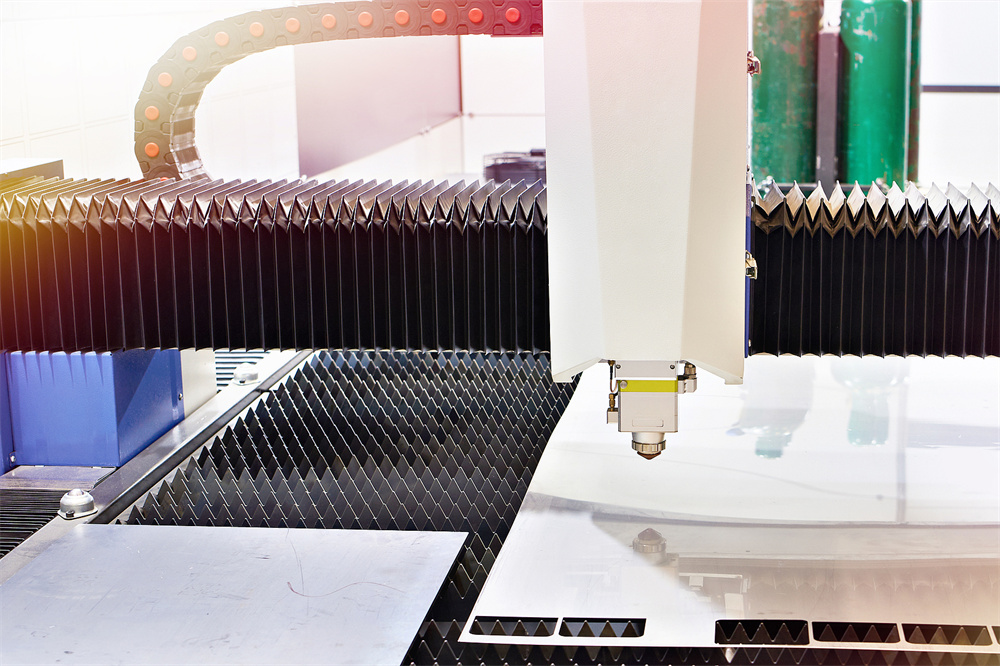
The optical path is another critical area. If the laser is firing but the beam is not reaching the material, the issue is likely in the delivery system. Inspect the mirrors and the focus lens for contamination, pitting, or misalignment. Even a small amount of dust or debris on the lens can absorb the laser energy, preventing it from cutting through the material. Clean the optics using approved cleaning solutions and lint-free wipes, following the manufacturer’s specific instructions.
Signal communication between the CNC controller and the laser source is the final technical hurdle. The controller sends a ‘Fire’ signal (usually a 0-10V or PWM signal) to the laser source. If this signal is not reaching the source, the laser will remain idle. Use an oscilloscope or a high-quality multimeter to verify that the signal is being sent when the ‘Test’ or ‘Start’ button is pressed. If the signal is absent, the issue lies in the wiring, the I/O board, or the controller software configuration.

Selection Advice for Reliable Laser Systems
When investing in metal fabrication equipment, the reliability of the laser source and the ease of troubleshooting are paramount. KAVDO recommends choosing machines that feature modular designs, which allow for easier component replacement and diagnostics. Look for systems that provide comprehensive real-time monitoring of laser parameters, as this significantly reduces the time required to identify the cause of a beam failure.
Consider the quality of the laser source manufacturer. Leading brands offer better technical support, more reliable hardware, and more frequent software updates. A machine is only as good as its weakest component; therefore, prioritize systems that use high-quality, industrial-grade power supplies and cooling units. These components are often the first to fail in cheaper, entry-level machines, leading to the very troubleshooting issues you are trying to avoid.
Another factor to consider is the availability of spare parts. When a laser beam fails, you need a replacement part immediately. Choose a supplier like KAVDO that maintains a robust inventory of critical components, including laser modules, power supplies, and optical lenses. Having a local service partner who understands the specific nuances of your machine can be the difference between a one-hour fix and a week-long production stoppage.
Finally, evaluate the training and documentation provided with the machine. A well-documented machine will include a detailed troubleshooting matrix that covers common issues like the beam not firing. Ensure that your operators are trained not just on how to run the machine, but on how to perform basic maintenance and diagnostics. Investing in operator training is one of the most effective ways to minimize downtime and extend the lifespan of your laser cutting machine.
Comprehensive Troubleshooting Checklist
To streamline your maintenance process, keep this checklist handy. It covers the most frequent causes of a laser beam not firing:
- Safety Interlocks: Check if the door sensors, emergency stops, or light curtains are active.
- Cooling System: Verify that the chiller is running, the water flow is sufficient, and the temperature is within the operating range.
- Power Supply: Use a multimeter to confirm that the laser power supply is receiving power and outputting the correct voltage.
- Software Settings: Ensure the laser power is set above the minimum threshold and that the correct cutting file is loaded.
- Optical Path: Clean the focus lens and inspect the mirrors for damage or misalignment.
- Signal Wiring: Check the integrity of the cables connecting the CNC controller to the laser source.
- Laser Source Status: Look for error lights on the laser module and consult the manual for specific fault codes.
- Gas Pressure: For some applications, insufficient assist gas pressure can cause the machine to pause or fail to initiate the cut.
FAQ: Common Laser Cutting Machine Questions
Why does my laser beam fire during the test but not during the actual job?
This is usually a software or file-related issue. Check your cutting parameters, such as speed and power, in your CAM software. If the speed is set too high for the material thickness, the laser may appear not to be firing. Also, ensure that the layer settings in your software are configured to ‘cut’ rather than ‘mark’ or ‘engrave’.
How often should I clean the laser optics?
The frequency depends on your operating environment and the materials you cut. In a clean, climate-controlled environment, a weekly inspection is sufficient. However, if you are cutting materials that produce significant smoke or debris, you may need to inspect and clean the lens daily to prevent damage.
What should I do if the laser source shows a ‘Communication Error’?
A communication error indicates that the CNC controller and the laser source are not ‘talking’ to each other. Check the fiber optic or Ethernet cable connecting the two units. Ensure the connections are secure and free of dust. If the problem persists, you may need to reset the communication protocol in the machine’s settings menu.
Can I replace the laser source myself?
While some components are user-replaceable, the laser source is a highly sensitive and expensive piece of equipment. KAVDO recommends that any major component replacement be performed by a certified technician to ensure proper calibration and to maintain your warranty coverage.
Conclusion
Troubleshooting a laser cutting machine beam not firing is a systematic process that requires patience and attention to detail. By following this guide, you can isolate the issue, whether it is a simple safety interlock, a software configuration error, or a hardware failure. Remember that regular maintenance, proper operator training, and the use of high-quality equipment are the best defenses against unexpected downtime.
At KAVDO, we are committed to providing the metal fabrication industry with reliable, high-performance machinery. If you have exhausted these troubleshooting steps and are still experiencing issues, do not hesitate to contact our technical support team. We are here to ensure your production lines remain operational and your business continues to thrive. Keep your machine clean, your software updated, and your safety protocols strictly enforced to maximize the longevity of your investment.