Laser Cutting Machine Vs Router Machine: Best Choice Metal Nonmetal Materials


Comparison Summary: Understanding the Core Differences
In the modern manufacturing landscape, choosing the right equipment is the cornerstone of operational efficiency and product quality. When evaluating the Laser Cutting Machine Vs Router Machine: Best Choice Metal Nonmetal Materials, manufacturers must look beyond the surface-level similarities of CNC (Computer Numerical Control) operation. While both machines follow digital paths to shape materials, their fundamental mechanisms—thermal energy versus mechanical force—dictate their suitability for specific industrial tasks.
A laser cutting machine utilizes a highly concentrated beam of light to melt, burn, or vaporize material. This process is non-contact, meaning the tool never physically touches the workpiece. In contrast, a CNC router uses a high-speed rotating spindle equipped with a cutting bit to physically remove material through friction and shear force. This mechanical contact allows routers to excel in deep carving and 3D shaping, whereas lasers are the masters of high-speed, high-precision 2D profiling.
The choice between these two technologies often hinges on the specific material properties, the required precision, and the production volume. For instance, thin sheet metal fabrication is almost exclusively the domain of fiber lasers, while thick wooden furniture components or heavy plastic signage often favor the versatility of a router. Understanding these nuances is essential for any business looking to optimize its shop floor for maximum ROI.
HARSLE, as a leader in metal fabrication machinery, recognizes that the “best” choice is rarely universal. It is a calculated decision based on the thickness of the substrate, the complexity of the design, and the long-term maintenance capabilities of the facility. In the following sections, we will dissect the technical specifications and practical applications of both machines to help you make an informed investment.
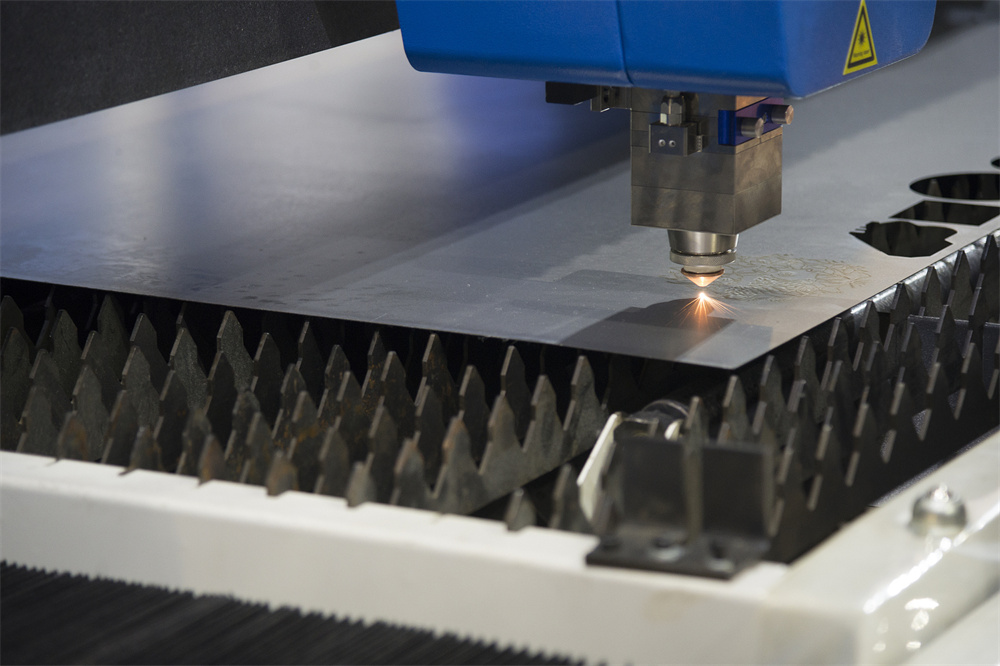
Laser Cutting Machine Overview: Precision and Speed
Laser cutting machines have revolutionized the industrial sector by offering unparalleled precision and speed. There are two primary types of lasers used in fabrication: Fiber lasers and CO2 lasers. Fiber lasers are the gold standard for metal processing, utilizing an optical fiber doped with rare-earth elements to amplify light. CO2 lasers, while older technology, remain highly effective for non-metallic materials like wood, acrylic, and glass.
The primary advantage of a laser cutting machine is its ability to produce an extremely narrow kerf (the width of the cut). Because the beam is focused to a point smaller than a millimeter, it can execute intricate designs that would be impossible for a mechanical bit to replicate. This precision is complemented by a high degree of repeatability, ensuring that the first part produced is identical to the thousandth.
Furthermore, laser cutting is a non-contact process. This eliminates the need for complex work-holding fixtures that might distort thin or delicate materials. Since there is no physical force applied to the workpiece, there is no risk of tool deflection or material shifting during the cut. This makes lasers ideal for high-speed production environments where downtime for setup and tool changes must be minimized.
HARSLE’s fiber laser systems are engineered to handle a wide range of metals, including carbon steel, stainless steel, aluminum, and brass. By integrating advanced CNC controllers and high-wattage laser sources, these machines achieve cutting speeds that far outpace traditional mechanical methods, especially on materials under 20mm in thickness. The result is a clean edge finish that often requires no secondary deburring or polishing.
Router Machine Overview: Versatility and Depth
CNC router machines are the workhorses of the woodworking, plastics, and soft metal industries. Unlike the laser, which relies on heat, the router uses a spindle that can rotate at speeds up to 24,000 RPM or higher. By utilizing various bit geometries—such as ball-nose, V-bit, or end mills—a router can perform a variety of tasks including drilling, pocketing, and 3D carving.
One of the most significant advantages of a router is its ability to control the depth of the cut (the Z-axis) with extreme accuracy. While a laser is typically used for through-cutting, a router can carve halfway into a material to create textures, slots, or recessed joints. This makes it the preferred choice for furniture manufacturing, cabinetry, and architectural millwork where 3D geometry is required.
Routers are also exceptionally capable when dealing with thick, non-metallic materials. While a CO2 laser might struggle to cut through 50mm thick wood without significant charring or fire risk, a CNC router can breeze through the same material by taking multiple passes. Additionally, routers are highly effective for processing “soft” metals like aluminum and brass, provided the machine is rigid enough and equipped with the proper cooling systems.
However, the mechanical nature of the router introduces certain limitations. The cutting bit has a physical diameter, which limits how tight an internal corner can be. There is also the issue of material waste; the kerf of a router bit is significantly wider than that of a laser beam. Furthermore, the physical force exerted by the bit requires robust vacuum tables or mechanical clamps to keep the workpiece from moving, which can increase setup time for complex parts.

Specification Comparison Table
| Feature | Laser Cutting Machine (Fiber/CO2) | CNC Router Machine |
|---|---|---|
| Primary Mechanism | Thermal (Light Beam) | Mechanical (Rotating Bit) |
| Best For Metals | Excellent (Fiber Laser) | Limited to Soft Metals (Aluminum/Brass) |
| Best For Nonmetals | Excellent (CO2 for Acrylic/Wood) | Excellent (Thick Wood/Plastic/Foam) |
| Precision/Kerf | Ultra-Fine (0.1mm – 0.3mm) | Moderate (3mm – 12mm bit diameter) |
| 3D Carving | No (Primarily 2D) | Yes (Full 3D Capability) |
| Heat Affected Zone | Present (May require edge cleaning) | None (Mechanical friction only) |
| Cutting Speed | Very High (Thin materials) | Moderate (Depends on bit and passes) |
| Maintenance | Low (No moving tool parts) | Moderate (Bit replacement/Spindle care) |
Best-fit Applications: Choosing Based on Material
Metal Fabrication Scenarios
When the primary goal is metal fabrication, the Laser Cutting Machine Vs Router Machine: Best Choice Metal Nonmetal Materials debate usually leans heavily toward the laser. Fiber lasers are specifically designed to handle the reflective and conductive properties of metals. They are the industry standard for automotive parts, aerospace components, and electrical enclosures. The speed at which a 3kW or 6kW fiber laser can cut through 6mm stainless steel is simply unmatched by any mechanical router.
However, there is a niche for routers in metalworking. For very thick aluminum plates (e.g., 40mm or thicker) where a high-power laser might be cost-prohibitive, a heavy-duty CNC mill or router can be used to hog out material. But for the vast majority of sheet metal work, the laser’s ability to nest parts tightly and cut with minimal waste makes it the superior economic choice.
Nonmetal and Composite Scenarios
In the realm of nonmetals, the choice becomes more nuanced. For thin acrylic signage, a CO2 laser is often preferred because it leaves a “flame-polished” edge that is perfectly clear and requires no further finishing. For wood, the choice depends on the desired outcome. A laser will leave a charred, dark edge on wood, which might be aesthetically pleasing for some crafts but undesirable for high-end furniture. A router leaves a clean, natural wood edge but produces significant sawdust.
For composite materials like Alucobond or Dibond, routers are frequently used because they can “V-groove” the material, allowing it to be folded by hand. A laser would struggle to perform a partial-depth fold-cut without damaging the core material. Similarly, for thick foam packaging or heavy-duty plastics like HDPE, the router’s ability to take deep mechanical bites is more efficient than the laser’s thermal melting process.
Cost and Maintenance Comparison
The financial implications of choosing a Laser Cutting Machine Vs Router Machine: Best Choice Metal Nonmetal Materials involve both initial capital expenditure (CAPEX) and ongoing operational expenditure (OPEX). Generally, a high-quality fiber laser cutting machine represents a significantly higher initial investment than a standard CNC router. The laser source itself is a sophisticated piece of technology that commands a premium price. However, for high-volume shops, the cost per part is often lower due to the speed and lack of tool wear.
Maintenance for laser machines focuses on the optical path. For fiber lasers, this is relatively minimal, involving the cleaning of protective windows and ensuring the gas supply (Oxygen, Nitrogen, or Air) is pure. CO2 lasers require more attention to mirrors and gas tube refills. There are no “bits” to dull, meaning the machine can run for thousands of hours with consistent results, provided the chiller and dust extraction systems are maintained.
CNC routers have a lower entry price, making them accessible to smaller shops and hobbyists. However, the OPEX can add up. Cutting bits are consumables that dull and break, requiring frequent replacement. The spindle, being a high-speed mechanical component, has a finite lifespan and will eventually require rebuilding or replacement. Additionally, the labor cost associated with cleaning the massive amounts of dust and chips generated by a router must be factored into the total cost of ownership.
Recommendation: How to Make the Final Decision
To determine the best choice for your facility, HARSLE recommends a three-step evaluation process. First, analyze your material mix. If your production is 80% metal, a fiber laser is an essential investment. If you are primarily working with wood, plastics, and only occasional soft metals, a CNC router offers the versatility you need at a lower price point.
Second, consider the complexity of your designs. Do you need to perform 3D carving, pocketing, or drilling at specific depths? If so, the router is your only viable option. If your work consists of flat profiles, intricate lace-like patterns, or high-speed blanking, the laser will provide the precision and throughput required to stay competitive.
Finally, look at your production volume. The high speed of a laser cutting machine makes it ideal for scaling up production. A single fiber laser can often replace three or four mechanical cutting stations. However, if you are a custom shop producing one-off pieces of furniture or unique architectural elements, the flexibility and lower cost of a router may be more aligned with your business model. At HARSLE, we provide expert consultation to help you match these technical capabilities with your specific business goals.
FAQ: Common Questions About Laser and Router Machines
Can a CNC router cut stainless steel?
While some heavy-duty industrial routers can cut thin stainless steel with the right bits and cooling, it is not recommended. The hardness of stainless steel leads to rapid tool wear and poor edge quality. A fiber laser is the correct tool for stainless steel fabrication.
Does laser cutting wood cause fires?
Laser cutting wood involves burning the material, so there is always a risk of fire. However, with proper air assist (blowing high-pressure air at the cut point) and a well-maintained exhaust system, the risk is minimized. Routers are generally safer for very thick wood sections.
Which machine is easier to learn?
Both machines use similar CAD/CAM software workflows. However, routers require more knowledge regarding “feeds and speeds” and tool selection to avoid breaking bits. Lasers are often seen as more “set and forget” once the cutting parameters for a specific material thickness are established.
What is the maximum thickness a laser can cut?
This depends on the wattage. A 12kW fiber laser can cut carbon steel up to 40mm or 50mm. However, for most standard industrial applications, lasers are used for materials between 0.5mm and 25mm. Beyond that, waterjet or plasma cutting might be considered alongside heavy-duty routing for non-metals.
Can I use a laser to engrave 3D images?
Standard CO2 and Fiber lasers are 2D machines. While they can perform “grayscale engraving” by varying power to create depth illusions, they cannot physically carve 3D shapes like a router can with a ball-nose bit. For true 3D relief carving, a CNC router is the superior choice.