How to Fix Frequent Alarms on a Laser Cutting Machine: A Comprehensive Maintenance Guide


Introduction to Laser Cutting Machine Alarms
In the fast-paced world of metal fabrication, efficiency is the cornerstone of profitability. When you are operating a high-performance fiber laser cutting machine, encountering frequent alarms can be more than just a minor annoyance; it can lead to significant production delays, wasted material, and increased operational costs. However, it is important to understand that these alarms are not necessarily signs of a failing machine. Instead, they are sophisticated protective measures designed by manufacturers like HARSLE to prevent catastrophic damage to sensitive components like the laser source, the cutting head, and the motion control system.
Learning how to fix frequent alarms on a laser cutting machine is an essential skill for any operator or shop manager. Most alarms are triggered by environmental factors, improper settings, or routine maintenance needs that have been overlooked. By systematically addressing these triggers, you can transform your production floor from a reactive environment into a proactive, high-uptime operation. This guide will delve deep into the technical reasons behind common alarms and provide actionable solutions to keep your machinery running at peak performance.

Whether you are dealing with gas pressure fluctuations, cooling system errors, or motion path deviations, the key is to understand the logic of the CNC system. Most modern laser machines utilize integrated software like CypCut or HypCut, which provide specific error codes. Understanding these codes is the first step in the troubleshooting process. In the following sections, we will explore the key considerations and technical details necessary to master your machine’s health.
Key Considerations for Troubleshooting Alarms
Before diving into specific technical fixes, it is crucial to establish a framework for troubleshooting. Not all alarms are created equal. Some are “soft” alarms that allow the machine to continue after a reset, while others are “hard” alarms that lock the system to prevent hardware damage. When you aim to fix frequent alarms on a laser cutting machine, you must first categorize the issue based on the machine’s primary subsystems: the laser source, the gas supply, the cooling system, and the mechanical motion components.
Environmental conditions play a massive role in machine stability. For instance, high humidity can lead to condensation within the laser source or the cutting head, triggering electrical leakage or optical path alarms. Similarly, unstable voltage from the factory grid can cause the servo drivers to trip. Before assuming there is a mechanical failure, always verify that the input power, ambient temperature, and air quality meet the manufacturer’s specifications. A stable environment is the foundation of an alarm-free operation.
Another key consideration is operator training. A significant percentage of frequent alarms are caused by improper parameter settings. For example, setting the follow-up height too low can cause the cutting head to collide with tilted parts, triggering a “collision alarm.” Likewise, using incorrect gas pressures for specific material thicknesses can trigger pressure sensor alarms. Ensuring that operators are well-versed in the software and the physical limitations of the machine is often the fastest way to reduce alarm frequency.
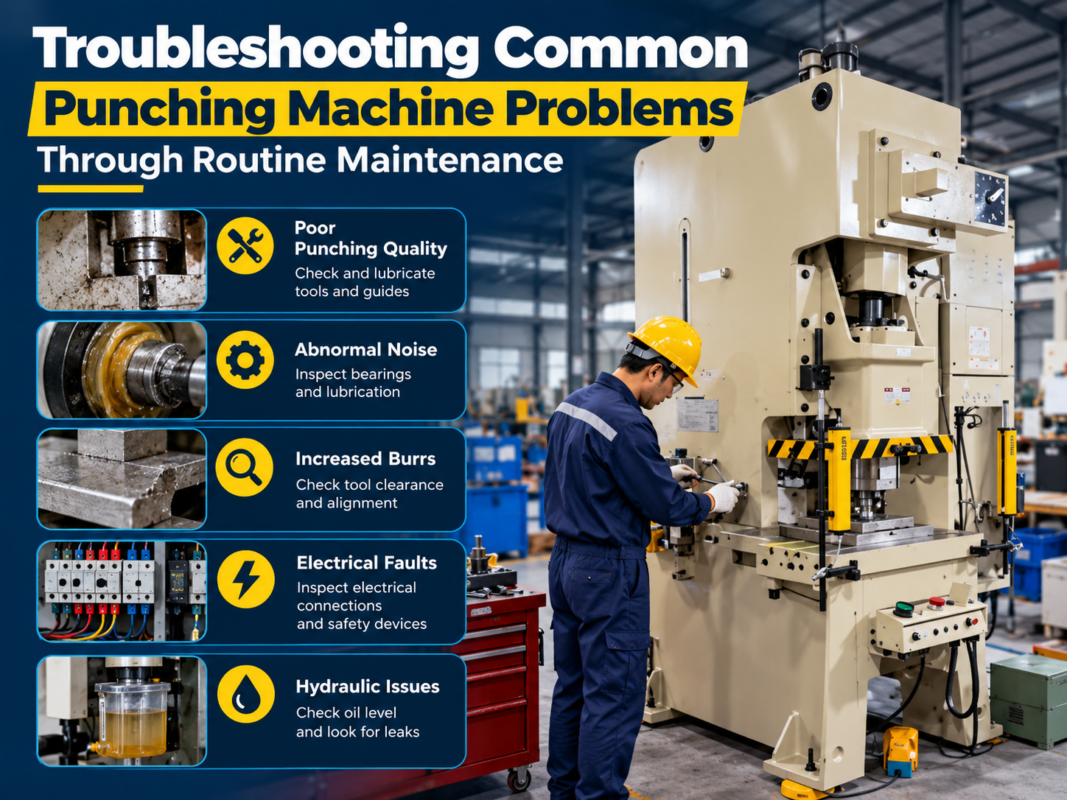
Finally, consider the age and maintenance history of the consumables. Worn-out nozzles, dirty protective windows, and clogged filters are the most common culprits behind “mysterious” alarms. A rigorous daily and weekly maintenance checklist is not just a recommendation; it is a necessity for high-power fiber lasers. By keeping the machine clean and well-lubricated, you eliminate the “noise” that often leads to false or frequent alarms.
Technical Details: Common Alarm Categories and Solutions
1. Gas Pressure and Supply Alarms
Gas pressure alarms are perhaps the most frequent issues encountered in metal fabrication. The laser cutting process relies on auxiliary gases—Oxygen (O2), Nitrogen (N2), or Compressed Air—to blow away molten metal and, in the case of oxygen, assist the combustion process. If the pressure drops below the set threshold, the machine will stop to prevent a poor cut or damage to the nozzle.
- Low Gas Pressure Alarm: This usually indicates that the source gas is running low or the regulator is set incorrectly. Check the pressure gauges at the tank and the machine inlet. If you are using a nitrogen generator or a compressor, ensure the flow rate matches the machine’s consumption during high-speed cutting.
- Gas Leakage: Inspect the pneumatic lines for cracks or loose fittings. Even a small leak can cause pressure fluctuations that trigger the sensor.
- Solenoid Valve Failure: If the gas does not flow despite high pressure at the source, the solenoid valve responsible for switching the gas may be stuck or burnt out.
2. Cooling System (Chiller) Alarms
The fiber laser source and the cutting head generate immense heat. The water chiller is responsible for maintaining a precise temperature to prevent thermal expansion and component failure. Chiller alarms are critical and should never be ignored.
| Alarm Type | Possible Cause | Recommended Solution |
|---|---|---|
| Water Flow Alarm | Clogged filters or kinked hoses. | Clean or replace the water filters; check hose routing. |
| High Temperature Alarm | Insufficient refrigerant or high ambient temp. | Check refrigerant levels; ensure the chiller has 1m of clearance for airflow. |
| Conductivity Alarm | Deionized water is contaminated. | Replace the water and the DI resin filter immediately. |
| Low Water Level | Evaporation or internal leak. | Top up with purified/distilled water and check for leaks. |
3. Cutting Head and Capacitive Sensor Alarms
The cutting head is the “business end” of the machine. It uses a capacitive sensor to maintain a constant distance from the metal sheet. This system is highly sensitive to electrical interference and physical debris.
To fix frequent alarms on a laser cutting machine related to the head, start by checking the “Follower Alarm” or “Commutation Error.” This often happens if the ceramic ring is cracked or if the nozzle is loose. The electrical signal between the nozzle and the sensor must be clean. If there is carbon buildup on the nozzle, the capacitance reading will be off, causing the head to dive or jump erratically. Regular calibration (one-click calibration in CypCut) is the standard fix for this issue.
4. Servo Motor and Motion Control Alarms
When the machine moves, the CNC controller constantly compares the commanded position with the actual position reported by the servo encoders. If the deviation is too large, a “Following Error” or “Overload Alarm” occurs. This is often caused by mechanical resistance. Check the guide rails for debris or lack of lubrication. If the gantry is not moving smoothly, the motors have to work harder, leading to overheating and alarms. Additionally, check the limit switches; if they are covered in metal dust, they may trigger a false “Hard Limit” alarm, stopping the machine mid-cut.
Selection Advice: Investing in Reliable Laser Cutting Equipment
While knowing how to fix frequent alarms on a laser cutting machine is vital, the best strategy is to invest in equipment designed to minimize these issues from the outset. When selecting a new laser cutting machine, consider the following factors to ensure long-term reliability:
- Component Quality: Look for machines that utilize world-class components. For example, HARSLE machines often feature IPG or Raycus laser sources, Schneider electrics, and Yaskawa or Panasonic servo motors. High-quality components have higher tolerance levels and are less likely to trigger false alarms.
- Robust Frame Construction: A heavy-duty, heat-treated bed reduces vibrations. Excessive vibration can lead to loose electrical connections and optical misalignment, both of which are major sources of frequent alarms.
- Integrated Software Features: Modern CNC systems include advanced diagnostic tools. Choose a machine with software that provides detailed alarm descriptions and troubleshooting suggestions directly on the screen. This reduces the time spent searching through manuals.
- After-Sales Support: No machine is immune to issues. Ensure your manufacturer provides robust technical support and readily available spare parts. A machine that is easy to service will always have higher uptime.
By choosing a manufacturer like HARSLE, you benefit from decades of engineering expertise. Our machines are designed with redundant safety systems and high-grade filtration to ensure that the “frequent alarms” seen on lower-end models are virtually non-existent. When you buy quality, you aren’t just buying a machine; you are buying peace of mind and consistent production cycles.
Frequently Asked Questions (FAQ)
Why does my laser machine keep showing a ‘Gas Pressure Low’ alarm even when the tank is full?
This is often due to a bottleneck in the supply line. If your hose diameter is too small or the distance from the tank to the machine is too long, the dynamic pressure (pressure while cutting) will drop significantly compared to the static pressure. Check your regulators and ensure the piping is rated for the required flow volume.
How often should I calibrate the cutting head to avoid alarms?
It is best practice to perform a quick manual calibration every morning during the machine warm-up and whenever you change the nozzle or the material type. This ensures the capacitive sensor accurately reads the distance to the workpiece, preventing collision alarms.
What should I do if I get a ‘Laser Source Error’?
First, check the chiller. Most laser source errors are actually secondary alarms triggered by the cooling system. If the chiller is running fine, check the laser source’s internal diagnostic lights. If the error persists, contact the manufacturer’s technical support immediately, as the laser source is a sealed unit that should only be serviced by professionals.
Can dust in the electrical cabinet cause alarms?
Yes, absolutely. Metal dust is conductive. If it accumulates on the servo drivers or the main PLC, it can cause micro-shorts that trigger various intermittent alarms. Ensure your electrical cabinet filters are cleaned weekly and the cabinet door remains closed during operation.
Conclusion
Mastering the ability to fix frequent alarms on a laser cutting machine is a journey of understanding the synergy between hardware, software, and environment. While alarms can be frustrating, they are the guardians of your investment. By maintaining a clean workspace, adhering to a strict maintenance schedule, and understanding the technical nuances of your gas and cooling systems, you can significantly reduce downtime.
At HARSLE, we pride ourselves on building industrial machinery that stands the test of time. Our fiber laser cutting machines are engineered to be intuitive and resilient, but they still require the care and attention of a skilled operator. By following the steps outlined in this guide, you will not only fix current issues but also prevent future ones, ensuring your metal fabrication business remains competitive and productive for years to come. Remember, a well-maintained machine is a profitable machine.