How to Solve Laser Cutting Machine Overheating Issues During Operation


Introduction to Thermal Management in Laser Cutting
In the high-precision world of metal fabrication, the fiber laser cutting machine stands as a pinnacle of efficiency and accuracy. However, the very nature of laser technology involves the concentration of immense energy into a microscopic point, a process that inherently generates significant heat. For operators and factory managers, understanding how to solve laser cutting machine overheating issues during operation is not merely a maintenance task—it is a critical requirement for ensuring the longevity of the equipment and the quality of the finished product.
Overheating can manifest in several ways, from sudden machine shutdowns and error codes to more subtle issues like a decrease in cutting quality, dross formation, or even permanent damage to the laser source and optical components. As a leading manufacturer of industrial machinery, HARSLE recognizes that thermal stability is the backbone of consistent production. When a laser cutting machine exceeds its optimal operating temperature, the internal components undergo thermal expansion, which can shift the focal point and lead to inaccurate cuts. Furthermore, the sensitive electronics within the laser generator are highly susceptible to heat-induced failure.
This comprehensive guide is designed to provide technical insights and practical solutions for managing the thermal load of your laser equipment. Whether you are operating a high-power 12kW fiber laser or a precision 1kW system, the principles of heat dissipation remain the same. By implementing a proactive cooling strategy, you can minimize downtime, reduce repair costs, and maintain the high-speed performance that HARSLE machines are known for. In the following sections, we will explore the root causes of overheating and provide a step-by-step framework to keep your operations running cool.
Key Considerations for Preventing Overheating
Before diving into technical repairs, it is essential to understand the environmental and operational factors that contribute to heat buildup. The first consideration is the ambient temperature of the workshop. Laser cutting machines are designed to operate within a specific temperature range, typically between 15°C and 35°C. If the factory floor exceeds these temperatures, the machine’s internal cooling system must work significantly harder to dissipate heat, often leading to a ‘chiller flow’ or ‘high-temperature’ alarm.
Another critical factor is the cleanliness of the machine’s surroundings. Dust and metal particles are inevitable in a fabrication shop, but if they accumulate on the chiller’s condenser coils or the laser source’s air intake, they act as an insulating blanket. This prevents efficient heat exchange with the air, causing the coolant temperature to rise rapidly. Regular cleaning of filters and ventilation paths is the simplest yet most overlooked method to solve laser cutting machine overheating issues during operation.
The duty cycle and power settings also play a major role. Running a machine at 100% power for extended shifts without adequate cooling intervals can overwhelm the thermal capacity of the system. Operators must match the cooling capacity of their industrial chiller to the power output of the laser. For instance, a 6kW laser requires a much more robust cooling solution than a 2kW laser. If the chiller is undersized for the application, overheating is an inevitable consequence of the physics involved in light amplification.
Finally, the quality of the cooling medium itself cannot be ignored. Using standard tap water instead of distilled or deionized water can lead to scale buildup inside the cooling channels. This scale acts as a thermal barrier and can eventually clog the narrow passages within the laser head or the laser source. Monitoring the conductivity and purity of the coolant is a fundamental step in maintaining a healthy thermal equilibrium within the system.
Technical Details of the Cooling System
The Role of the Dual-Circuit Industrial Chiller
Modern fiber laser cutting machines utilize a dual-circuit cooling system, which is essential for protecting different components with varying temperature requirements. One circuit is dedicated to cooling the laser source (the resonator), while the other focuses on the cutting head and optics. The laser source typically requires a stable temperature around 25°C to prevent condensation and ensure stable beam quality. In contrast, the cutting head optics are often kept at a slightly higher temperature (around 28-30°C) to prevent moisture from the air from condensing on the lenses, which could lead to catastrophic lens failure upon laser firing.
The chiller works on a refrigeration cycle involving a compressor, a condenser, an expansion valve, and an evaporator. When the coolant (water) absorbs heat from the laser components, it is pumped back to the chiller. Inside the evaporator, the heat is transferred from the water to the refrigerant. The compressor then increases the pressure of the refrigerant, and the condenser releases the heat into the ambient air. Any failure in this cycle—such as a refrigerant leak, a faulty compressor, or a blocked expansion valve—will immediately result in overheating.
Optical Path and Nozzle Heat Accumulation
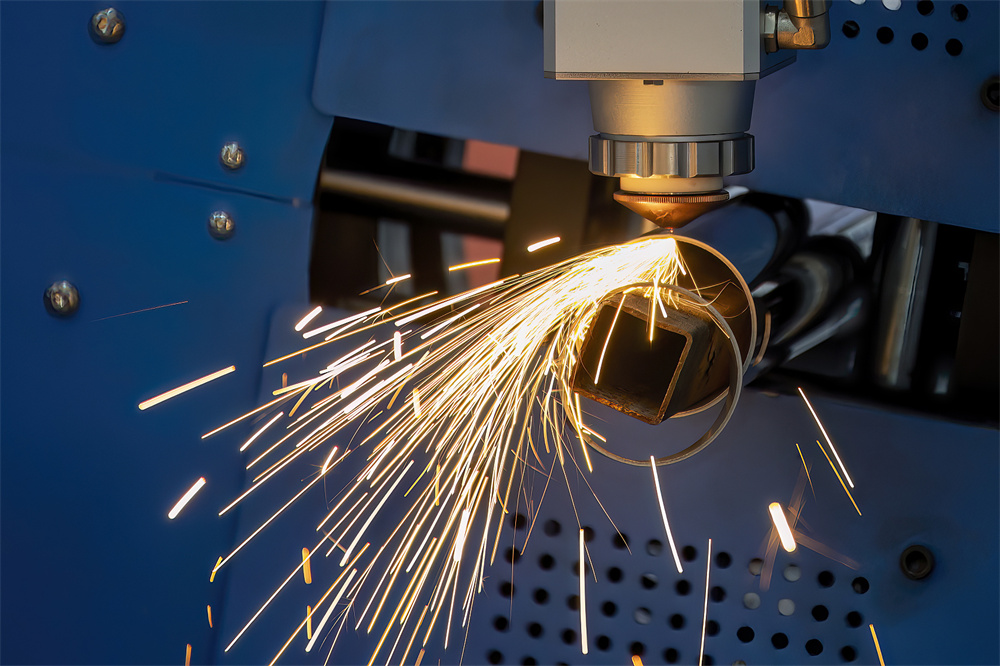
Overheating isn’t always a system-wide issue; it can be localized to the cutting head. The optical path consists of collimating lenses and focusing lenses that must be perfectly aligned. If these lenses are contaminated with dust or if the protective window is burnt, they will absorb a portion of the laser energy instead of transmitting it. This absorbed energy converts into heat, causing the cutting head to reach dangerous temperatures. This is why monitoring the temperature of the cutting head via the machine’s software is vital for early detection of optical issues.
| Component | Typical Operating Temp | Overheating Symptom | Primary Solution |
|---|---|---|---|
| Laser Source | 22°C – 26°C | Power instability / Alarm | Check chiller refrigerant levels |
| Cutting Head | 28°C – 32°C | Focus shift / Burnt lens | Replace protective window / Clean optics |
| Cooling Water | Set by Chiller | Flow rate alarm | Clean water filters and pump intake |
| Electrical Cabinet | < 40°C | PLC / Driver errors | Check cabinet AC or fans |
Selection Advice for Optimal Thermal Performance
When purchasing a laser cutting machine, selecting the right cooling infrastructure is as important as the laser power itself. At HARSLE, we recommend that buyers look for machines equipped with high-quality industrial chillers from reputable brands like S&A or Hanli, which are specifically engineered for fiber laser applications. Ensure that the chiller’s cooling capacity (measured in Watts or BTU/hr) exceeds the heat load generated by the laser source by at least 20% to provide a safety margin during hot summer months.
Furthermore, consider the machine’s structural design. Machines with integrated air conditioning for the electrical cabinet are superior for environments with high humidity or high ambient temperatures. This prevents the sensitive servo drivers and CNC controllers from overheating, which is a common cause of phantom errors and mid-program stops. If your facility is located in a region with extreme temperatures, investing in a water-cooled chiller with an external heat exchanger might be necessary to move the heat outside the building entirely.
Another selection tip involves the gas delivery system. Using high-purity assist gases (Oxygen or Nitrogen) not only improves cut quality but also helps in cooling the material and the nozzle during the cutting process. Ensure your machine has a robust gas pressure regulation system. Low gas pressure during thick plate cutting can lead to excessive heat buildup in the nozzle area, as the gas is not effectively blowing away the molten metal and cooling the kerf.
Step-by-Step Guide to Solve Overheating Issues
- Check the Chiller Water Level and Quality: Ensure the water level is within the green zone on the gauge. If the water is cloudy or has been in the system for more than three months, drain it, flush the system, and refill with fresh distilled water and a specialized laser algaecide.
- Clean the Dust Filters: Locate the air filters on the sides of the chiller and the laser source. Remove them and use compressed air to blow out dust. If the filters are greasy, wash them with mild soap and dry them completely before reinstallation.
- Inspect the Condenser Coils: Use compressed air to clean the metal fins of the chiller’s condenser. If these are clogged with dust, the chiller cannot release heat into the air, leading to a rapid rise in coolant temperature.
- Verify Pump Pressure and Flow Rate: Check the chiller’s display for flow rate alarms. A kinked hose, a clogged internal filter, or a failing pump can reduce the flow of coolant, causing the laser source to heat up even if the water in the chiller is cold.
- Monitor Ambient Conditions: If the workshop temperature exceeds 35°C, use industrial fans to improve airflow around the machine or consider installing an air conditioning unit for the laser room.
- Inspect Optical Components: If the cutting head is overheating, check the protective window for spots or cracks. Even a tiny speck of dust can absorb enough laser energy to cause thermal runaway in the lens assembly.
Frequently Asked Questions (FAQ)
Why does my laser machine stop with a ‘Flow Alarm’ even when the water is cold?
A flow alarm usually indicates that the volume of water moving through the system is insufficient. This can be caused by a clogged filter, a kinked water pipe, or a blockage inside the laser source’s cooling channels. It is a safety mechanism to prevent the laser from firing without adequate heat removal. Check all hoses and clean the chiller’s internal mesh filter to resolve this.
Can I use automotive antifreeze in my laser cutting machine?
You should only use antifreeze specifically formulated for industrial lasers if your environment drops below freezing. Standard automotive antifreeze contains silicates and other additives that can gunk up the sensitive cooling channels of a fiber laser. Always consult HARSLE’s maintenance manual or your chiller manufacturer before adding any chemicals to the coolant.
How often should I change the cooling water?
In a clean environment, the water should be changed every 3 to 6 months. However, in dusty or high-production environments, a 2-month interval is safer. Always use distilled or deionized water to prevent mineral buildup (scale), which is a leading cause of long-term overheating issues.
What is the ideal temperature for a fiber laser source?
Most fiber laser manufacturers recommend a set point between 24°C and 26°C. It is crucial that this temperature remains stable. If the temperature fluctuates by more than 1-2 degrees, the laser’s wavelength and beam stability can be affected, leading to inconsistent cutting results.
Does the type of assist gas affect machine temperature?
Yes. Assist gases like Nitrogen and Oxygen help cool the cutting zone. If the gas pressure is too low, the heat from the molten metal can radiate back into the cutting head, causing the nozzle and internal optics to overheat. Ensure your gas settings are optimized for the material thickness you are cutting.
Conclusion
To solve laser cutting machine overheating issues during operation, one must adopt a holistic approach that combines regular maintenance, environmental control, and technical monitoring. Overheating is rarely a result of a single catastrophic failure; rather, it is often the culmination of neglected filters, poor water quality, or inadequate ventilation. By following the protocols outlined in this guide, operators can ensure that their HARSLE laser cutting machines remain in peak condition, delivering the precision and speed required for modern industrial demands.
Investing time in daily and weekly thermal checks not only protects your equipment but also guarantees the safety of your operators and the quality of your output. As laser technology continues to evolve with higher power ratings, the importance of robust thermal management will only grow. Stay proactive, keep your cooling systems clean, and monitor your machine’s vitals to keep your production line moving without interruption. For further technical support or to explore our latest high-performance laser models, contact the HARSLE engineering team today.